
Important Notice of CanvasWorkspace
About CanvasWorkspace/ScanNCut Link
For more information about CanvasWorkspace and ScanNCut Link,
please click here.
[ Note ]
ScanNCut Link is available only in certain regions.
Important Notice Regarding CanvasWorkspace/ScanNCut Link
Notice of Termination of the CanvasWorkspace WEB
- The CanvasWorkspace Web version has been discontinued.
-
The CanvasWorkspace PC and ScanNCut Link now share the same account as Artspira.
Please continue using the CanvasWorkspace PC version, ScanNCut Link, and Artspira.
If you link your Artspira account to the CanvasWorkspace PC version, you can access the same features as in the CanvasWorkspace WEB version.
Please see the important notice below for details.
Important Notice Regarding CanvasWorkspace PC / ScanNCut Link
CanvasWorkspace PC / ScanNCut Link has been updated.
-
CanvasWorkspace PC and ScanNCut Link have been updated to allow account information to be shared with Artspira.
For more information about Artspira, please click here.-
If you do not have an Artspira ID
When you use either app for the first time, link your CanvasWorkspace login ID to your Artspira account.
It will take a little time to link your data when you log in for the first time.
If you have been using CanvasWorkspace, please be sure to check this. -
If you have an Artspira ID
-
For users who have been accessing Artspira using their CanvasWorkspace login ID
Please follow the on-screen instructions to log in.
Please click here for detailed instructions.
Later, by linking your account from the user information screen, you’ll be able to use both apps with your linked account without having to enter your CanvasWorkspace login ID and password.
Please click here for detailed instructions. -
If you have been using Artspira with a Google or Apple account but have not yet linked your CanvasWorkspace login ID
After logging in to both apps with your Google or Apple account, you can link your CanvasWorkspace login ID.
Please click here for detailed instructions. -
Users who have a Google or Apple account on Artspira and have already linked it to their CanvasWorkspace login ID
Please log in with your Google or Apple account.
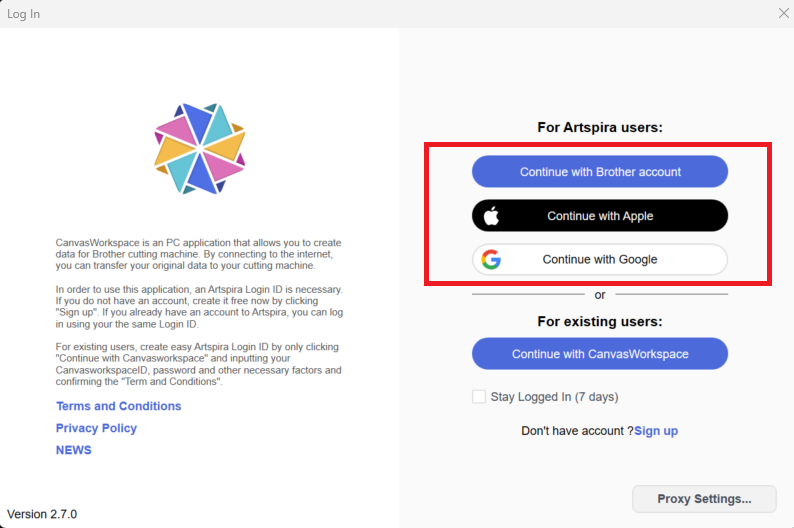
-
For users who have been accessing Artspira using their CanvasWorkspace login ID
-
If you do not have an Artspira ID
-
[For CanvasWorkspace PC users only]
-
You can transfer data from CanvasWorkspace PC to Artspira.
Please click here for detailed instructions. -
Previously, data from 'My Projects' as well as 'Pattern Collection' and 'Disney' was provided through the CanvasWorkspace WEB version.
You can download all of this data at once from the account settings screen on the PC version.
Please click here for detailed instructions. - We have previously provided Canvas Project collections. These designs are now available through Artspira. We encourage you to use Artspira! If you need specific designs that were previously provided as part of Canvas Project, please click here.
-
You can transfer data from CanvasWorkspace PC to Artspira.