
CanvasWorkspace PC Download
CanvasWorkspace is an application that allows you to create and edit cutting or drawing pattern data and download that data to your cutting machine.
Download the installer, and then install Brother CanvasWorkspace (PC) to your computer.
Supported OS
Windows
Windows 11
macOS
macOS 15, 26
Download
| OS | Software | Version | File / Size | File |
|---|---|---|---|---|
| Windows | ||||
| macOS (Apple Silicon) | ||||
| macOS (Intel) |
Update History
How to install CanvasWorkspace
Windows
- Double-click the downloaded ".exe" file on the File Explore.
- The User Account Control dialog box appears. Click [Yes].
- The setup wizard starts up, and the first dialog box appears.
- Click [ Next ] to continue with the installation.
- Click Install.
-
Click Finish.
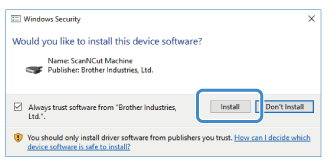
If the following screen appears, click Install.
macOS
- Log on to your computer as an administrator.
- Download the file and save it on the computer.
- Double-click the ".pkg" file to install.
- Click [ Continue ], and then follow the on-screen instructions.
-
After the installation is finished, start CanvasWorkspace.
You must create an account for CanvasWorkspace before using this application.